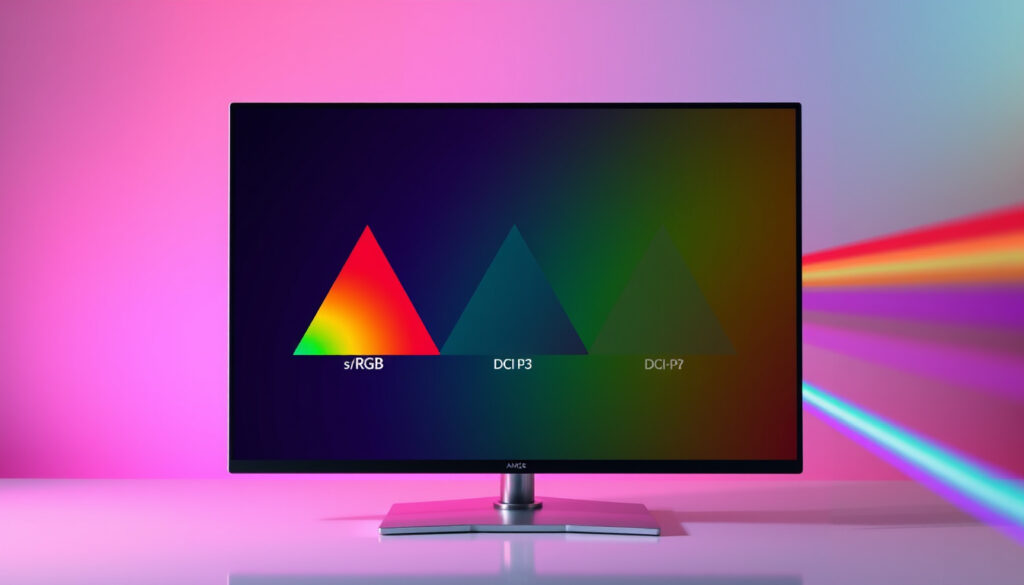
What Is a Color Gamut? sRGB, Adobe RGB, DCI-P3 Explained
If you’ve ever shopped for a monitor or projector, you’ve seen the numbers: “99% sRGB,” “90% DCI-P3,” maybe an “Adobe RGB” badge. Those percentages aren’t just marketing fluff—they describe the range of colors a device can actually show you. This guide breaks down what color gamut means, how the main standards compare, and what numbers actually matter for your work or entertainment.
Definition of color gamut: Range of colors a device can reproduce or record ·
Common color gamut standards: sRGB, Adobe RGB, DCI-P3, NTSC, Rec. 709 ·
sRGB coverage typical on monitors: 95% to 100% for standard displays ·
DCI-P3 coverage on premium displays: up to 90% or higher ·
Human eye visible spectrum: CIE 1931 chromaticity diagram as reference ·
Wide color gamut benefit: More vibrant, accurate colors especially in HDR
Quick snapshot
- Color gamut is the subset of colors a device can reproduce (Cevaton knowledge base).
- sRGB covers about 35% of the human visible spectrum (Mobile Pixels).
- DCI-P3 covers approximately 45% of the visible spectrum (Mobile Pixels).
- Exactly how much wider DCI-P3 is than sRGB varies by measurement method (area vs. volume).
- The threshold for “good” gamut depends on user task, not a universal number.
- Rec. 2020 (ITU-R BT.2020) aims to cover a wider portion of the visible spectrum.
- Emerging displays target 90%+ Rec. 2020 for next-gen HDR.
The table below lays out the key numeric reference points for color gamut coverage and bit depth.
| Label | Value |
|---|---|
| Human eye visible colors | Approximately 10 million colors |
| sRGB coverage of visible spectrum | Approximately 35% |
| DCI-P3 coverage of visible spectrum | Approximately 45% |
| Common monitor sRGB coverage | 99–100% for modern IPS panels |
| Adobe RGB coverage of visible spectrum | Approximately 50% (Mobile Pixels) |
| 72% NTSC ≈ 100% sRGB | Rough equivalence (Uperfect) |
| DCI-P3 covers ~90% NTSC | ~45% visible spectrum (Uperfect) |
| sRGB bit depth | Usually 8-bit |
| DCI-P3 bit depth for HDR | Often 10-bit |
What is meant by color gamut?
The CIE 1931 color space as reference
Color gamut refers to the complete subset of colors a device (monitor, projector, printer, camera) can reproduce or record. The human eye can perceive a much larger range than any device—the CIE 1931 chromaticity diagram maps that full human-visible spectrum. Every device’s gamut is a smaller shape inside that diagram, usually drawn as a triangle whose corners are the primary colors it can produce (Cevaton knowledge base).
- The bigger the triangle, the more saturated colors the device can show.
- Two devices with the same gamut percentage may still differ in how they render specific hues due to internal calibration.
A monitor that covers 100% sRGB still cannot display the deep red of a tulip that falls outside sRGB’s triangle. The gamut is a hard boundary, not a suggestion.
How gamut is measured as area on chromaticity diagram
Gamut size is expressed as a percentage of a reference standard (e.g., “95% sRGB” means the device covers 95% of the sRGB triangle area). Because the CIE diagram is not a perfect grid, area percentages don’t evenly correspond to the number of distinguishable colors. Uperfect’s guide notes that 72% NTSC coverage is roughly equivalent to 100% sRGB, illustrating how different standards map onto each other.
The pattern: Gamut numbers are relative—always compare percentages within the same standard, not across sRGB and Adobe RGB directly.
What are the main color gamut standards?
sRGB: the web and general use standard
sRGB (standard Red Green Blue) was created in 1996 by HP and Microsoft as a unified color space for monitors, the web, and consumer electronics. It covers about 35% of the visible spectrum (Mobile Pixels). Almost all digital content—websites, apps, YouTube—is mastered in sRGB, making it the safe baseline.
- Typical office monitors: 95–100% sRGB.
- Gaming monitors: usually 99–100% sRGB, with some budget models dropping to 90%.
Adobe RGB: wider gamut for print photography
Introduced in 1998 by Adobe, this space expands the green and cyan regions to better match CMYK printing. It covers roughly 50% of the visible spectrum (Mobile Pixels) and about 75% of the NTSC gamut (Uperfect). Photographers who edit for print benefit from Adobe RGB because they can preview colors that fall outside sRGB.
A monitor with 90% Adobe RGB is excellent for photo editing, but if you share those images online as sRGB, the extra gamut is lost unless you consciously convert.
DCI-P3: cinema standard for HDR and video
DCI-P3 (Digital Cinema Initiatives – Protocol 3) was defined in 2002 for digital cinema projection. It covers about 45% of the visible spectrum (Cevaton knowledge base) and is approximately 25% wider than sRGB, with richer reds and greens (KTC Play). It’s now the standard for HDR video, 4K Blu-ray, and many high-end monitors.
- Modern premium displays: 90%+ DCI-P3 coverage.
- HDR content mastered in DCI-P3 looks noticeably punchier than sRGB.
NTSC and Rec. 709: legacy and broadcast
NTSC (1953) is an older television standard rarely used today, but references like “72% NTSC” still appear in spec sheets as a comparative metric. Rec. 709 is the HDTV broadcast standard, essentially identical to sRGB in primary colors but with a different gamma.
Is color gamut the same as sRGB?
sRGB is a specific color gamut standard
No. Color gamut is a generic concept meaning “the range of colors a device can reproduce.” sRGB is one defined implementation of that concept—a specific triangle inside the CIE diagram. There are dozens of gamut standards (Adobe RGB, DCI-P3, Rec. 2020, etc.), each with its own shape and size. Saying “my monitor has a color gamut of sRGB” is like saying “my car has a fuel efficiency of highway mpg.”
Gamut is the generic term, sRGB is one implementation
Monitor specs often display “99% sRGB.” That tells you the device covers nearly all of the sRGB triangle, but it says nothing about how it would perform on Adobe RGB or DCI-P3. Always check which standard the percentage refers to.
Why this matters: A monitor with 100% sRGB may only achieve 75% DCI-P3. If you’re editing HDR video, that’s a critical gap.
What is a good color gamut for a monitor or projector?
For office and web use: 99–100% sRGB
For Word documents, spreadsheets, browsing, and email, there’s no reason to exceed sRGB. Most modern IPS panels deliver 99–100% sRGB out of the box. Anything above 95% is acceptable; below 90% you’ll see noticeably less saturated colors (Uperfect).
For photo editing: Adobe RGB coverage above 90%
If you shoot RAW and output for print, look for a monitor with at least 90% Adobe RGB. Many professional photo monitors advertise 99% Adobe RGB. A display with only sRGB will hide colors that the printer can actually produce (Mobile Pixels).
For video and HDR: DCI-P3 coverage 90% or more
HDR video content is mastered in DCI-P3. A monitor with 90%+ DCI-P3 will show the vibrant reds and greens as intended. Budget projectors often reach only 70–80% sRGB due to light output limits, so be cautious with projector specs.
Is 90% color gamut good? Explanation of context
90% sRGB is okay for casual use but not ideal for color-critical work. 90% DCI-P3 is excellent for HDR. 90% Adobe RGB is great for print. The number means nothing without the standard attached.
The pattern: Match the gamut standard to your primary task—don’t pay for DCI-P3 if you only do office work, and don’t settle for sRGB if you grade video.
Is higher color gamut always better?
Wider gamut without calibration can cause oversaturation
If you plug a wide-gamut monitor (say, 90% DCI-P3) into a computer that expects sRGB, colors can appear overly saturated and inaccurate. Without proper color management, the extra gamut works against you (KTC Play). Many professional displays offer sRGB emulation modes to clamp the gamut when needed.
Operating system and content must support the gamut
Windows and macOS handle wide gamut differently. macOS has system-level color management; Windows is improving but still inconsistent. An sRGB photo viewed on a DCI-P3 monitor without correction will look unnaturally saturated. Cevaton’s guide warns that oversaturation can lead to editing mistakes.
The catch: A wider gamut is only an asset if your entire pipeline—from camera to editing software to display to output—supports it. Otherwise, you’re better off with a well-calibrated sRGB monitor.
Four standards, one trade-off: sRGB is safe and universal, Adobe RGB gives photographers headroom for print, DCI-P3 brings cinema-style HDR, and NTSC lingers as a historical benchmark. The best gamut is the one that matches the work you actually do.
Here is how the five main standards measure up against each other in visible spectrum coverage, use case, and typical bit depth.
| Standard | Visible spectrum coverage | Primary use case | Bit depth typical | Year introduced |
|---|---|---|---|---|
| sRGB | ~35% | Web, office, consumer | 8-bit | 1996 |
| Adobe RGB | ~50% | Print photography, design | 8- or 10-bit | 1998 |
| DCI-P3 | ~45% | Cinema, HDR video | 10-bit (HDR) | 2002 |
| NTSC | ~35% (approx.) | Legacy TV reference | 8-bit | 1953 |
| Rec. 709 | ~35% | HDTV broadcast | 8- or 10-bit | 1990 |
The following technical specifications detail the exact CIE xy coordinates and gamma for the three most common gamut standards.
| Property | sRGB | Adobe RGB | DCI-P3 |
|---|---|---|---|
| Red primary (CIE xy) | 0.640, 0.330 | 0.640, 0.330 | 0.680, 0.320 |
| Green primary (CIE xy) | 0.300, 0.600 | 0.210, 0.710 | 0.265, 0.690 |
| Blue primary (CIE xy) | 0.150, 0.060 | 0.150, 0.060 | 0.150, 0.060 |
| White point | D65 (6500K) | D65 (6500K) | D65 (6500K) |
| Gamma | 2.2 | 2.2 | 2.6 |
| Gamut volume (relative) | 1.0 (baseline) | ~1.4× | ~1.25× |
Clarity section
Confirmed facts
- Color gamut is a subset of the human visible spectrum.
- sRGB covers about 35% of the CIE 1931 color space (Mobile Pixels).
- DCI-P3 covers approximately 45% of the visible spectrum (Cevaton knowledge base).
What’s unclear
- Exactly how much wider DCI-P3 is than sRGB varies by measurement method (area vs. volume).
- The threshold for “good” gamut depends on user task, not a universal number.
- Real-world perceived color difference between 95% and 100% sRGB may be invisible to untrained eyes.
“Color gamut is the range of colors a device can produce or record.”
— BenQ Knowledge Center (BenQ display educator)
“Color gamut describes a range of colors within the spectrum that can be reproduced.”
— ViewSonic Library (ViewSonic display resource)
“Color gamut describes the range of colors a device, such as a projector or display, can accurately reproduce.”
— Barco Entertainment Glossary (Barco projection glossary)
The consequence is clear: For photographers who deliver to print, investing in an Adobe RGB monitor above 90% coverage is a tangible advantage. For casual users and office workers, a well-calibrated 100% sRGB display is all they need—and paying extra for DCI-P3 buys nothing but potential calibration headaches.
Frequently asked questions
What is the difference between color gamut and color space?
Color gamut is the range of colors a device can reproduce; color space includes the gamut plus a transfer function (gamma) and white point. sRGB is both a gamut and a color space.
Do I need a wide color gamut monitor for photo editing?
If you edit for print, yes—Adobe RGB coverage above 90% helps you see colors a printer can produce but sRGB cannot. For web-only editing, sRGB is sufficient.
How can I test my monitor’s color gamut?
Use online tools like Lagom LCD test or a hardware calibrator such as X-Rite or Spyder. Software cannot measure gamut as accurately as a colorimeter.
What does 100% sRGB mean?
It means the monitor covers the entire sRGB triangle when measured against the standard. That’s excellent for web and office but doesn’t guarantee good coverage of Adobe RGB or DCI-P3.
Does color gamut affect gaming performance?
No. Gamut affects color accuracy and vibrancy, not frame rates. Some gamers prefer wide-gamut displays for richer HDR, but it has zero impact on FPS.
Is DCI-P3 better than sRGB for watching movies?
Yes, if the movie is HDR. Most 4K Blu-rays are graded in DCI-P3. A monitor with 90%+ DCI-P3 will show deeper reds and greens than sRGB. For standard Blu-ray or streaming, sRGB works well.
What is the standard color gamut for HDR?
The most common HDR gamut is DCI-P3. Some high-end HDR monitors also support Rec. 2020, but that standard is not yet widely used in consumer content.
More related posts
 M&S Cork: Store Locations, Opening Hours, Online Shopping
 Houses for Sale in Kells: Verified Prices & Listings
 Best Bars Not in Reykjavik, Iceland – Local Guide
 How Many km in a Marathon? Distance, History & Times
 Outlook Email Sign In: How to Log into Your Microsoft Account
 Latest on Ukraine War: Military, Economy, Putin’s Position
 Compare Travel Insurance Ireland: Quotes & Reviews
 110 Pounds in Euro: Live Rates, Fees & Best Converters
